






Your servicesRenewal & cancellation
Renew a service early
If your client area offers it, pay the next term of a service before it is due: open Renew Services, check the renewal period and price, then check out.
- Beginner
- 4 min read
- Updated
Tested on: HyperDC client area
This guide is not available in your language yet, so it is shown in English.
On this page
Normally a service renews when you pay its renewal invoice, which we send before the next due date. If your client area offers early renewal, you can also pay the next term yourself ahead of time, for example before a holiday. This guide shows how.
Before you start
A service can be renewed early when:
- its status is Active;
- it has no unpaid invoices;
- it is within its renewal period;
- it uses recurring billing (one-time and usage-billed services cannot be renewed this way).
Step 1: Open Renew Services
Choose one of these ways, if your client area shows them:
- Services › Renew Services in the left menu opens a list of all your services.
- Renew Service on a service page, in the Next Due Date card of the Overview tab, opens the page for that one service.
The page opens with the note "Renew a service early: add it to your cart, then check out."
Step 2: Check the renewal period and price
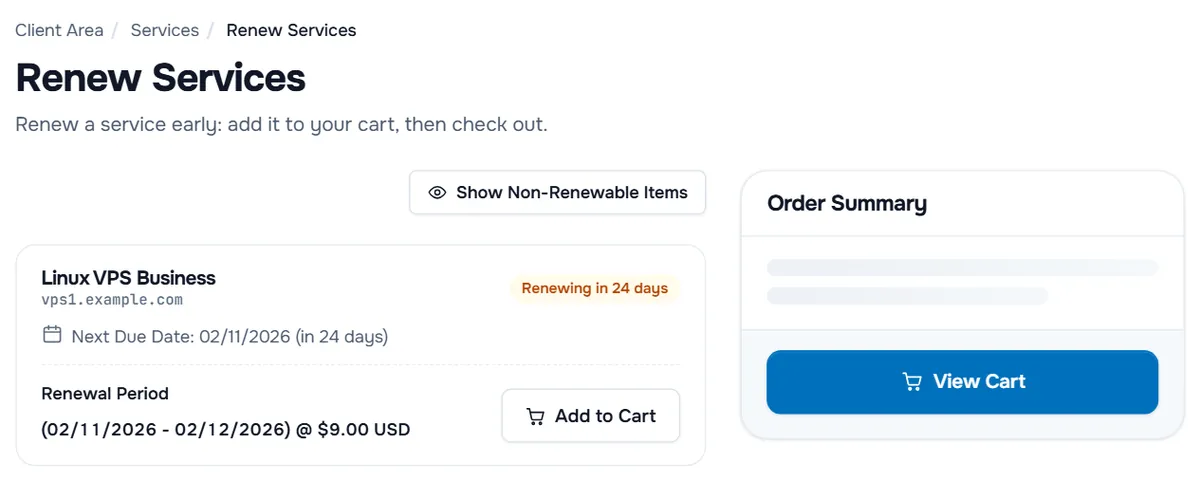
For each service that can be renewed, the page shows:
- the service name and domain, with a badge such as "Renewing in 24 days";
- "Next Due Date:" with the date and how far away it is;
- Renewal Period: the term you pay for, from your next due date to the end of the new term, and its price;
- the add-ons of the service under Addons, if they can be renewed too.
If you have more than five services, a search box (Search by Name, Domain, or ID) helps you find one.
Show Non-Renewable Items also lists the services you cannot renew right now, marked Renewal Unavailable with the reason, for example "This service is not within its renewal period." or "This product does not support on-demand renewals." Select Hide Non-Renewable Items to hide them again.
Step 3: Add the renewal to your cart and pay
- Select Add to Cart next to the renewal. The button changes to Added, and the Order Summary on the right shows the amount.
- Repeat for other services you want to renew.
- Select View Cart, check the items and complete the checkout. See review your cart.
- Pay the invoice that is created; see pay an invoice.
Verify: after the payment, the Next Due Date of the service moves to the end date shown under Renewal Period.
Troubleshooting
The page says "You do not currently have any services that are eligible for renewal." None of your services can be renewed early right now. Select Show Non-Renewable Items, if shown, to see why, or wait for the renewal invoice.
A service shows Renewal Unavailable. Read the reason under it. Pay unpaid invoices of the service first; a suspended or pending service must be active again; a service outside its renewal period can be renewed later.
I added the wrong service. Remove it from the cart before you check out.
Next steps
- How renewals and overdue invoices work: renewals and overdue invoices.
- Pay the renewal invoice: pay an invoice.
- Check the due dates of all services: find your services in My Services.
Frequently asked questions
Do I lose days if I renew early?
No. The new term starts at your current next due date, as the Renewal Period on the page shows: from the next due date to the end of the new term.
Why is one of my services not listed?
Services that cannot be renewed right now are hidden. Select Show Non-Renewable Items to see them, each with the reason, for example an unpaid invoice or a service that is not active.
Can I renew the add-ons of a service as well?
Yes, where they can be renewed: they are listed under Addons below their service, each with its own renewal period and Add to Cart button.
What if my client area does not show Renew Services?
Then early renewal is not offered for your account. You receive a renewal invoice before the next due date; paying it renews the service.