






Your servicesRenewal & cancellation
Cancel a service
Cancel a HyperDC service in the client area: back up first, choose immediate or end-of-period cancellation, and see what happens to invoices and domains.
- Beginner
- 6 min read
- Updated
Tested on: HyperDC client area
This guide is not available in your language yet, so it is shown in English.
On this page
You can cancel any service from its page in the client area. This guide helps you do it without losing data and explains what happens to invoices, domains and refunds.
Before you start
- Back up your data. Files, databases, email and configuration. See backup strategy and, for a full server, the backup steps in reinstall the operating system.
- Move what depends on the service. Point your domain to its new home and lower DNS TTLs in advance; see move a website without downtime.
- Check the refund policy if you cancel soon after paying. Only a new customer's first purchase with a billing term of up to one month can qualify, within 30 days of payment. The refund policy lists what is not covered and the conditions. Crypto payments are final and non-refundable.
- Invited users need the permission Place New Orders/Upgrades/Cancellations from the account owner.
Step 1: Open the cancellation form
- Go to Services › My Services and select Manage next to the service.
- Open Actions › Request Cancellation, or select Request Cancellation in the Upgrade/Downgrade card on the Overview tab.
The page Account Cancellation Request opens with the note "Tell us why you are leaving and when the service should end." Back to Service Details takes you back without changes.
Step 2: Fill in the form
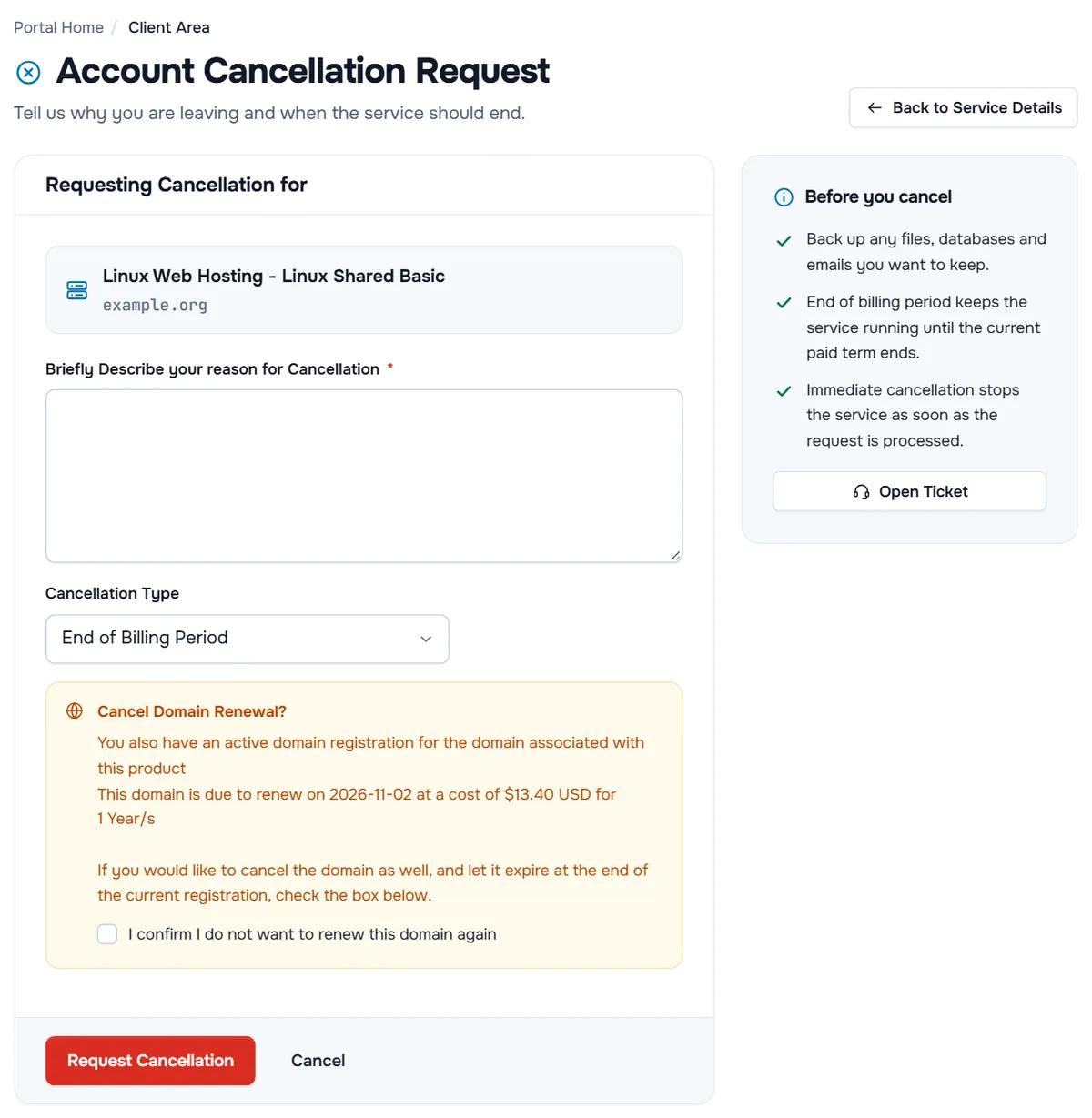
- Requesting Cancellation for shows the product and its domain. Check that it is the service you want to cancel.
- Briefly Describe your reason for Cancellation is required. A short reason helps us improve and tells our team if something needs a follow-up.
- Cancellation Type — choose when the cancellation takes effect:
- End of Billing Period (selected by default): the service keeps running until the end of the term you have paid for. Recommended in most cases, because it leaves time to finish moving.
- Immediate: the service stops as soon as the request is processed.
- Cancel Domain Renewal? appears when a domain registered with us belongs to the service. It shows when the domain is due to renew and at what cost. Tick I confirm I do not want to renew this domain again to let the domain expire at the end of its current registration. Leave it unticked to keep the domain.
The Before you cancel box on the right repeats the key points, with an Open Ticket button if you would rather talk to us first.
Step 3: Submit the request
Select Request Cancellation. To leave the page without cancelling, select Cancel next to it.
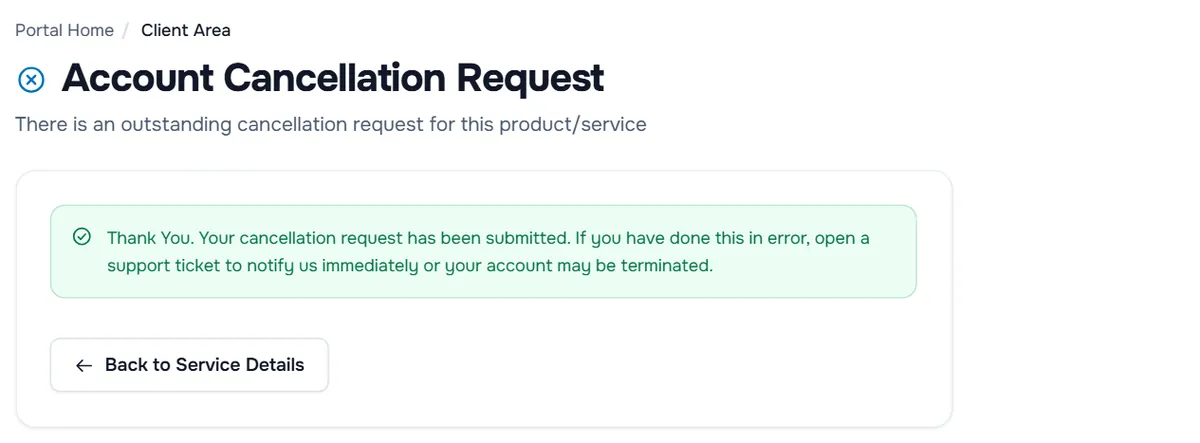
Verify: the page confirms "Thank You. Your cancellation request has been submitted." Back on the service page, the notice "There is an outstanding cancellation request for this product/service" appears and the cancel button shows Cancellation Requested. The notifications under the bell in the top bar list the request too.
What happens next
- The service runs until the chosen date, then it is terminated and its data deleted.
- No new renewal invoices are created for the cancelled service. If a renewal invoice already exists and you chose End of Billing Period, check Billing › My Invoices and open a ticket if you are unsure whether it still needs to be paid.
- Add-ons that belong to the service end with it.
- Domains stay registered unless you ticked the domain question. To stop a domain from renewing later, turn off Auto Renew on the domain page; see manage your domain.
Requesting a refund
If this was your first purchase as a new customer, its billing term is one month or less and you cancel within 30 days of payment, open a ticket after submitting the cancellation, name the service and the invoice, and ask for the refund. Repeat purchases, longer billing terms, bulk orders, domain names, dedicated servers and SSL certificates are not covered. The refund policy has the full conditions and explains how refunds are paid. Crypto payments are final and are not refunded.
Troubleshooting
There is no Request Cancellation entry. A request is already pending (the button shows Cancellation Requested), the service is not active, or your user lacks the permission Place New Orders/Upgrades/Cancellations. For other cases, open a ticket.
"You must enter a cancellation reason". Write a few words in the reason field and submit again.
"This account has already had a cancellation request submitted so you cannot submit another." The request is already registered; nothing else is needed.
I cancelled the wrong service. Open a ticket immediately with the service name.
The service was suspended for an unpaid invoice and I want to cancel it. You can still request the cancellation. Ask in a ticket whether the open invoice is cancelled with it.
Next steps
- Keep your data safe elsewhere: backup strategy.
- Questions about refunds: refunds FAQ.
- Decide what happens to your domain: manage your domain.
Frequently asked questions
What is the difference between Immediate and End of Billing Period?
Immediate stops the service as soon as the request is processed. End of Billing Period keeps it running until the current paid term ends, which gives you time to move your data. End of Billing Period is selected by default.
Will I get a refund?
The refund policy decides. Only a new customer's first purchase with a billing term of up to one month can qualify, and only if you cancel within 30 days of payment. Repeat purchases, longer billing terms, bulk orders, domain names, dedicated servers and SSL certificates are not covered. Crypto payments are final and non-refundable.
Does cancelling a hosting plan also cancel my domain?
Not automatically. If a domain registered with us belongs to the service, the form asks Cancel Domain Renewal? Tick the confirmation to let the domain expire at the end of its current registration. If you leave it unticked, the domain stays registered.
Can I undo a cancellation request?
Open a support ticket as soon as possible. Before the service is terminated, a request can usually be withdrawn; afterwards the data is gone.
What happens to my data after cancellation?
When the service is terminated, the server or hosting account and everything on it are deleted. Download what you need before the cancellation takes effect.