

GTA V (FiveM) server: order, connect, settings and admin
Set up your GTA V (FiveM) server at HyperDC: the order fields, what runs automatically, how players connect, the console, files, admin rights and common fixes.
- Beginner
- 12 min read
- Updated
On this page
This guide covers the GTA V (FiveM) server you rent from HyperDC. You manage it on its service page in the client area, under Services › My Services. There is no separate game panel. For the basics that apply to every game, see game servers: getting started.
Order your server
Choose a plan for GTA V (FiveM) and fill in the order form. These are the fields it asks for, under the names the form uses:
| Field | What to enter |
|---|---|
| Location | Pick the location closest to most of your players. Game servers are offered in 20 locations. |
| Additional Player Slots | The plan includes 14 players. Add more here, up to 128 in total. CPU, memory and disk grow with the player count. |
| Server Name | Shown in the game's server browser. 3 to 60 characters: letters, digits, spaces and - _ . ! ( ) [ ] # : , + ' *. |
| RCON Password | Becomes rcon_password in server.cfg (RCON on the game port). 8 to 32 characters: letters, digits and . _ -, not starting with -. |
| Additional RAM (GB), Additional Disk (GB), Additional CPU Cores | Optional extras on top of the plan. |
What happens automatically
- The server files are installed for you, with txAdmin on the type that includes it.
- The page shows the progress while the server is being set up. You can leave the page: the build carries on, and the controls appear when it is ready.
- Ports are assigned to your server and opened for you.
- Before every start the panel writes your server name and RCON Password into
server.cfg, so a change in the Settings tab reaches the game at its next start. - CPU, memory and disk follow the number of players you ordered.
Connect to your server
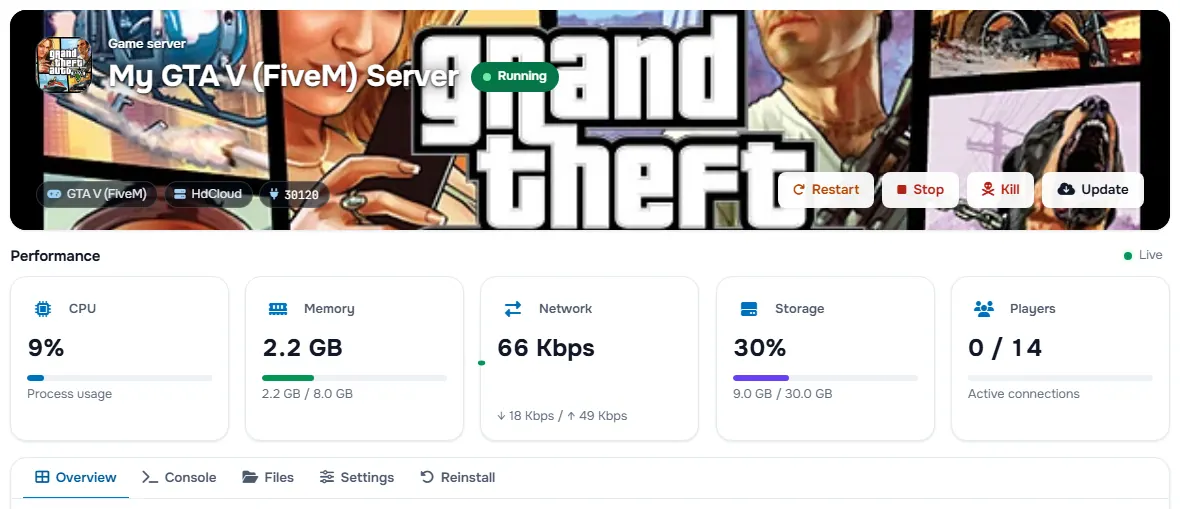
- Open Services › My Services and choose your game server.
- On the Overview tab, find the address under Connect and press the copy button.
- Players press F8 in FiveM and type connect with the address, or find the server in the server list.
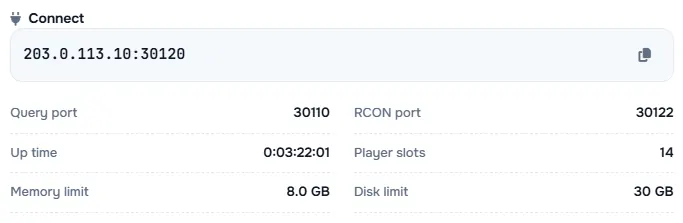
The panel assigns the ports, so your port can differ from the game's usual 30120: always use the one under Connect. The same box lists the Query port and RCON port.
Start, stop and update
The banner at the top of the service page has the Start, Restart, Stop and Kill buttons. Stop shuts the game down its own way and saves where the game can; use Kill only when the server no longer reacts.
If your plan shows a Reinstall tab, it installs the game again from scratch. Every server file is deleted and this cannot be undone, so you must type REINSTALL to confirm.
Use the console
The Console tab shows what the server prints while it runs. Type a command in the Type a command… box and press Enter or the send button. Commands are the game's own.
Change the settings
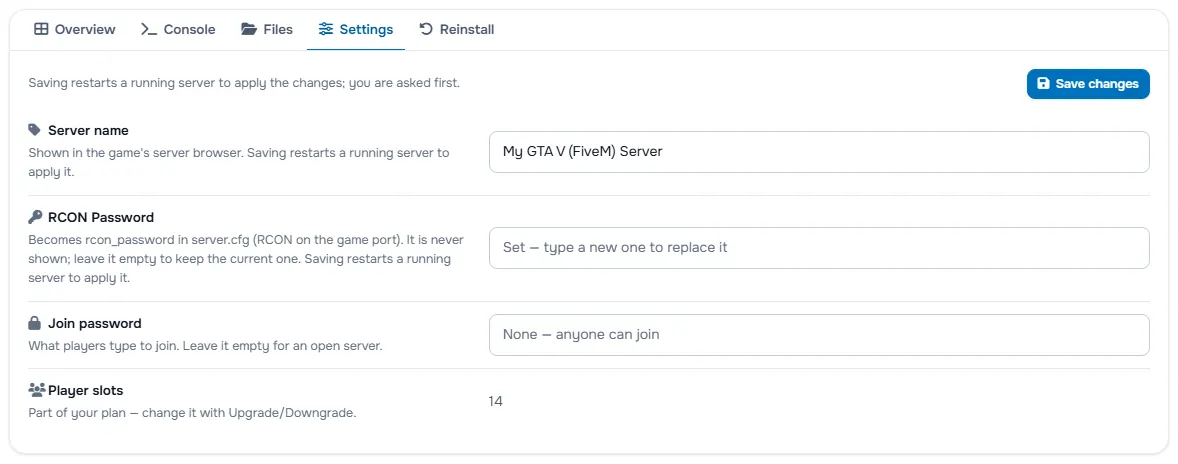
The Settings tab lists what you can change for this game, starting with Server name, RCON Password, Join password, Player slots. The player slots are part of your plan: change them with Upgrade/Downgrade.
Press Save changes. Saving restarts a running server to apply the changes, and you are asked first. A stopped server stays stopped and uses the new values at its next start.
Edit the game's files
The Files tab shows the server folder. You can edit text files and save them, upload files of up to 100 MB each, make folders and files, and right-click anything to rename, delete, compress, extract or download it.
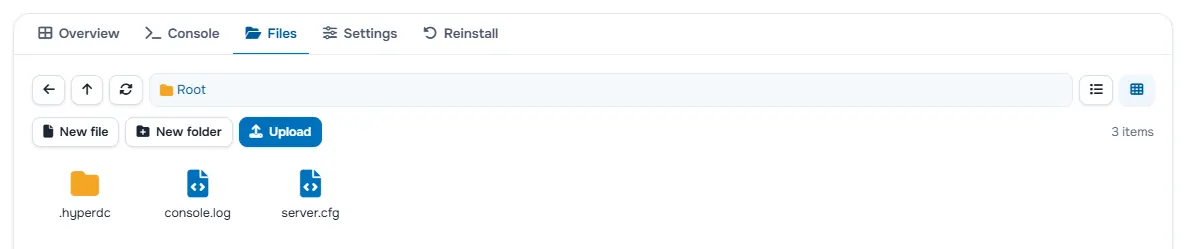
The game's own settings files:
| File | Settings it holds |
|---|---|
server.cfg | endpoint_add_tcp, endpoint_add_udp, sv_hostname, sv_maxclients, rcon_password, sv_licenseKey |
To change a file by hand:
- Press Stop. Many games rewrite their settings files when they shut down, so an edit made while the server runs can be lost.
- Open the file in the Files tab, change it and save it.
- Press Start.
Keep a copy of your world
Game servers have no automatic backups, so keep your own copy before big changes. This guide does not name one fixed save folder for this game. In the Files tab, compress the folders you changed and download the archive.
Become an admin
Add a line like this to server.cfg, with your identifier, for example fivem:<number> from your forum.cfx.re profile, or use add_principal in the Console tab:
add_principal identifier.fivem:123456 group.adminGood to know
sv_licenseKeyinserver.cfgis your own Cfx.re server key, not a password.- There are two server types. FiveM asks for an RCON Password. FiveM + txAdmin asks for none: you name the server and make your admin account in txAdmin, which opens on the port shown as RCON port.
Upgrade or switch game
Open the service page and choose Actions › Upgrade/Downgrade for another plan or game, or Upgrade/Downgrade Options for players, RAM, disk and CPU. You pay or receive the prorated difference through the normal upgrade invoice.
- Same game: your files stay. A running server restarts once to apply the change.
- Another game: the new game is installed first. Then the old server and all its files are deleted and no copy is kept. The address stays, the ports change, and the server name and password move to the new server. You must tick the confirmation box before checkout, so download your world first.
See upgrade or downgrade a service for the steps.
Common problems
Players cannot find the server in the list. Check that the banner shows the server as running and give the list a few minutes. Where the game allows a direct connection, use the address from the Overview tab.
Players are told the versions differ. Players and server need the same version of the game. Check which version the server runs in the Console tab.
A change in a settings file is gone after a restart. Stop the server before you edit the file, because many games rewrite it when they shut down. The server name and password always come from the Settings tab.
The server does not start after a change. Read the last lines in the Console tab, then undo the last file or mod you changed.
The server lags at busy times. Look at the CPU and Memory cards under Performance. If they are full, add Additional RAM (GB) or Additional CPU Cores with Upgrade/Downgrade Options.
The order form refuses the password. Use 8 to 32 characters: letters, digits and . _ -, not starting with -.
Next steps
- Basics for every game: game servers: getting started.
- Lower latency for your players: choose a data center location.
Frequently asked questions
What does the order form ask for a GTA V (FiveM) server?
Location, Server Name, RCON Password, and the optional extras for players, RAM, disk and CPU. The fields use the names in this guide.
How do players join my GTA V (FiveM) server?
Players press F8 in FiveM and type connect with the address, or find the server in the server list. Use the address and port from the Overview tab.
How do I become an admin on GTA V (FiveM)?
Add add_principal identifier.fivem:123456 group.admin to server.cfg, with your own identifier.
Are there automatic backups?
No. To keep a copy, compress the folder in the Files tab and download it.