






DomainsRenewal, lock & contacts
Renew your domain and turn on auto renew
Keep your domain registered: switch on auto renew, renew one or several domains for more years, and know what happens if a domain passes its expiry date.
- Beginner
- 6 min read
- Updated
Tested on: HyperDC client area
This guide is not available in your language yet, so it is shown in English.
On this page
A domain stays registered only as long as it is renewed. The simplest way never to lose one is auto renew: a renewal invoice is created before the expiry date, and the domain is renewed when the invoice is paid. You can also renew by hand at any time, for one or more years. This guide covers both, and what happens if a domain passes its expiry date.
Before you start
- Keep a way to pay. Make sure the payment methods available for your account still work, for example a saved card. See invoices and payment methods.
- Keep your email address current. Renewal invoices and reminders go to the email address of your account.
- Check the dates. Domains › My Domains shows the Next Due Date of every domain with the days left; Expiring Soon filters the domains that need attention.
How renewal works
- Auto renew on: the renewal invoice is created automatically before the domain expires. The bulk auto renew page puts it this way: "When enabled, we will automatically send you a renewal invoice a few weeks before your domain expires, and renew the domain should payment be successful."
- Auto renew off: no renewal invoice is created. You renew by hand, or the domain expires at the end of its term.
- Either way, a renewal is processed once its invoice is paid.
Step 1: Turn auto renew on or off
You can switch auto renew in three places:
- in Domains › My Domains, with the switch in the Auto Renew column;
- on the domain page, with the Auto Renew switch in the header;
- on the domain page, in the Auto Renew tab.
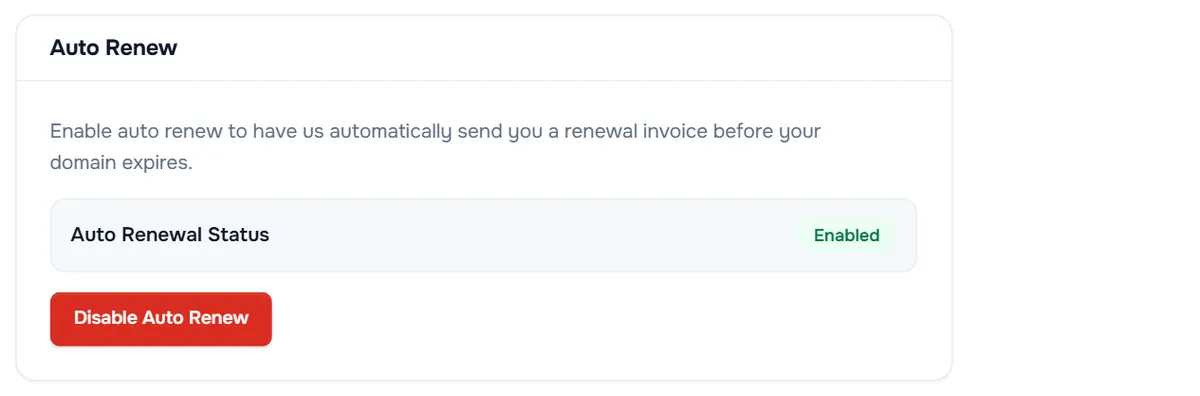
The tab says: "Enable auto renew to have us automatically send you a renewal invoice before your domain expires." Auto Renewal Status shows Enabled or Disabled. Select Enable Auto Renew to turn it on, or Disable Auto Renew to turn it off.
Verify: the tab shows Changes Saved Successfully! and the new status; the switch in My Domains shows the same state.
To change many domains at once, select them in My Domains and choose Auto Renewal Status, see bulk domain management.
Step 2: Renew a domain now
Renew by hand to add years before the expiry date, or when auto renew is off:
- Select Renew Domain on the domain page, or open Domains › Renew Domains to see every domain you can renew.
- Each domain shows its Expiry Date, a badge such as Expiring in 17 days, and Available Renewal Periods.
- Choose the period, then select Add to Cart. The button changes to Added.
- Add other domains if you like, then select View Cart in the Order Summary and check out.
- Pay the invoice, see pay an invoice.
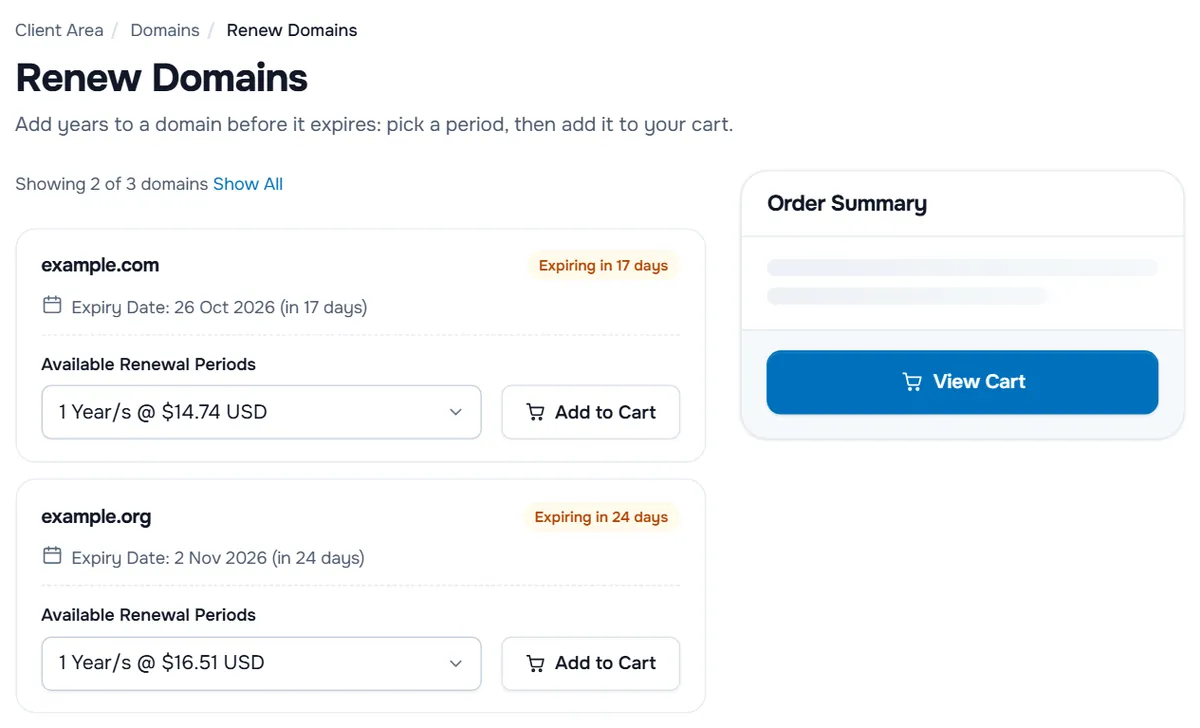
If you opened the page from one domain or a selection, it shows only those, with a note such as "Showing 2 of 3 domains"; select Show All for the others.
Verify: after the invoice is paid and the renewal is processed, the Next Due Date of the domain moves forward by the period you chose.
When a domain cannot be renewed right now
The badge on the Renew Domains page explains why:
- Maximum Advance Renewal is followed by a number of days: the domain cannot be renewed this far ahead. Renew it later.
- Domain Renewal Unavailable: the domain cannot be renewed from this page. Open a ticket with the domain name.
- Past Renewable Period: the domain is too far past its expiry date to be renewed here. Open a ticket at once.
If the page says "You do not currently have any domains that are eligible for renewal", none of your domains can be renewed at the moment.
What happens after the expiry date
If a domain is not renewed by its expiry date, it expires and its website and email can stop working. Depending on the extension, a grace or redemption period may apply, in which the domain can still be renewed, with an extra fee:
- My Domains then shows a status such as Grace Period (Expired) or Redemption Period (Expired).
- On Renew Domains, the period list adds a Grace Fee or Redemption Fee to the price, and a badge shows how many days ago the domain expired.
- The page notes that a domain in the grace period may only be renewed for the minimum registration term.
After these periods, the domain can be deleted and become available to anyone. The rules differ by extension; see the domain registration agreement.
Troubleshooting
No renewal invoice was created. Auto renew is off for the domain, or the invoice already exists. Check the Auto Renew tab and Billing › My Invoices.
I paid, but the Next Due Date did not change. The renewal is processed after the payment is recorded. Check that the invoice shows as paid; if the date still does not change, open a ticket with the domain name.
The domain is missing from Renew Domains. It is not eligible for renewal right now, for example because of the advance renewal limit, or it was transferred away.
The domain expired and the website is down. Renew it immediately. Resolution returns once the registry has processed the renewal. See DNS not resolving.
Next steps
- See all renewals and overdue invoices of your account: renewals and overdue invoices.
- Change many domains at once: bulk domain management.
- Back to the domain overview: manage your domain.
Frequently asked questions
What does auto renew do?
With auto renew enabled, a renewal invoice is created automatically before the domain expires, and the domain is renewed once the invoice is paid. Without it, no renewal invoice is created and you renew by hand.
Does auto renew charge me without an invoice?
Auto renew creates the renewal invoice. How it is paid depends on your payment method and account; you can always pay the invoice yourself under Billing › My Invoices.
Can I renew for several years at once?
Yes, where the extension allows it. Available Renewal Periods on the Renew Domains page lists the periods and their prices.
Why can I not renew my domain yet?
Each extension limits how far ahead a domain can be renewed. The page then shows Maximum Advance Renewal with the number of days; renew again when the domain is within that window.
What happens if my domain expires?
Its website and email can stop working. Depending on the extension, a grace or redemption period may apply in which the domain can still be renewed, with an extra fee. After that it can be lost, so renew before the expiry date.